

AI Agents with n8n: Intelligent Workflow Automation
Introduction
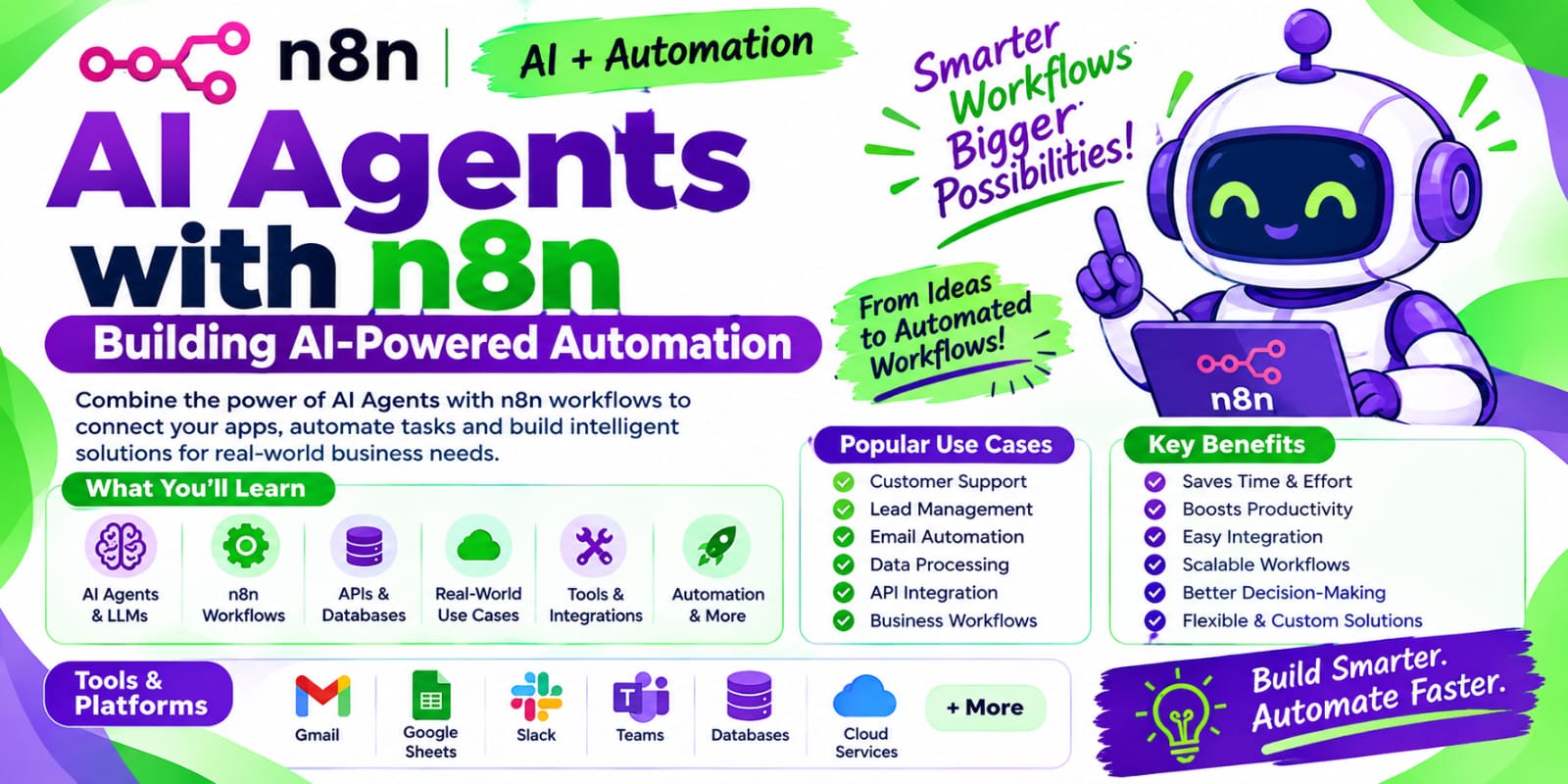
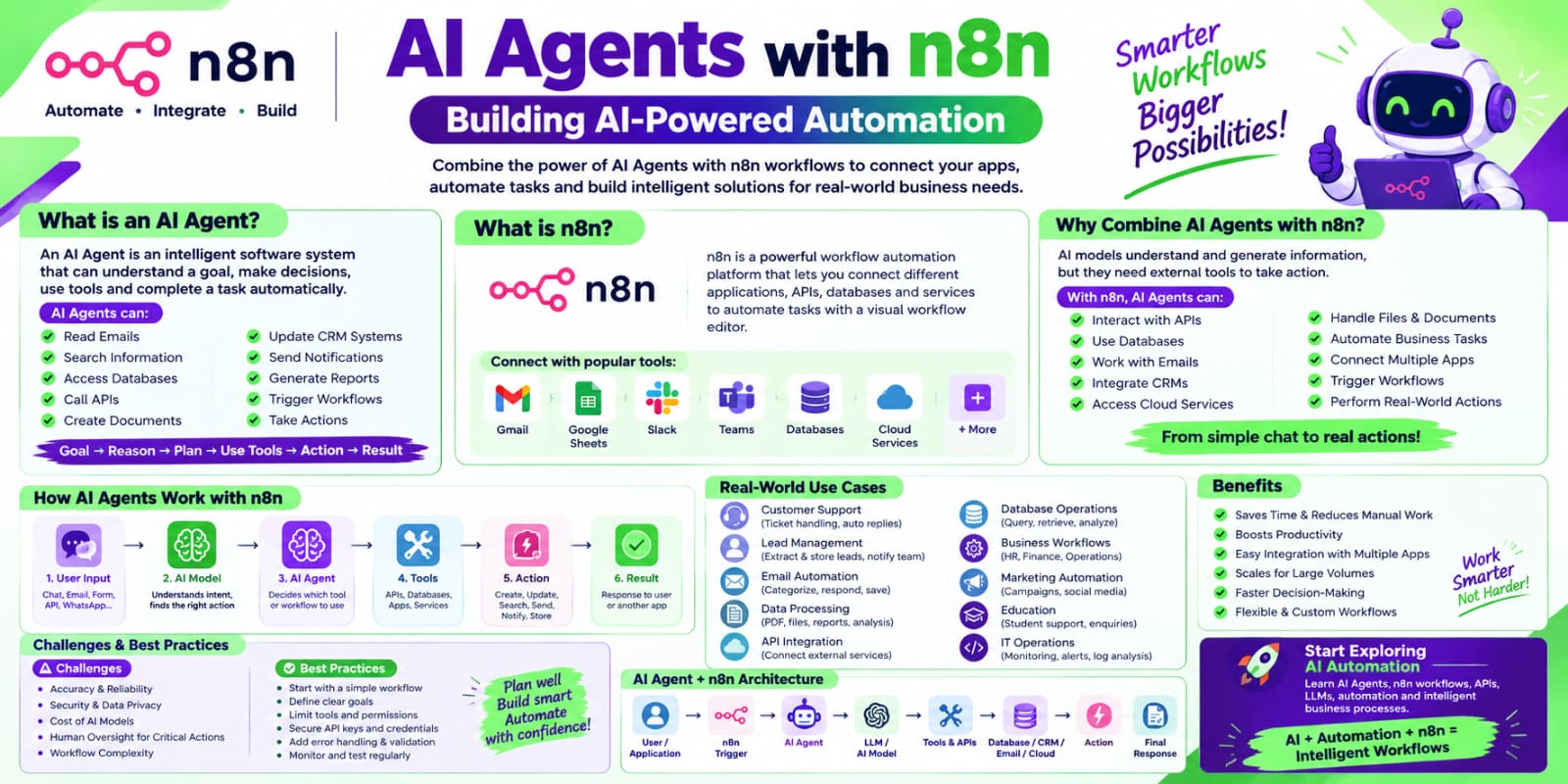
Artificial Intelligence (AI) is transforming the way businesses automate tasks, process information, and interact with customers. AI Agents take automation a step further by allowing systems to understand a goal, make decisions, use tools, and complete tasks with minimal human intervention.
n8n is a powerful workflow automation platform that can be used to connect applications, APIs, databases, AI models, and business tools. By combining AI Agents with n8n, organizations can build intelligent workflows that can analyze information, make decisions, and perform actions automatically.
This combination is useful for creating AI-powered automation without requiring every workflow to be built from scratch using complex programming.
What is an AI Agent?
An AI Agent is a software system that can understand instructions, reason about a task, use available tools, and take actions to achieve a specific goal.
Unlike a traditional automation workflow that follows a fixed sequence of steps, an AI Agent can dynamically decide what action should be performed based on the information it receives.
For example, an AI Agent can:
Read an incoming email
Understand the customer's request
Search a knowledge base
Generate an appropriate response
Store information in a database
Send the response to the customer
This makes AI Agents useful for handling tasks that require decision-making and flexible workflows.
What is n8n?
n8n is a workflow automation platform that allows users to connect different applications and services.
It provides a visual workflow interface where users can create automation by connecting different nodes. These nodes can represent applications, APIs, databases, triggers, actions, AI models, and other services.
n8n can be used to automate tasks involving:
Gmail
Slack
Microsoft Teams
Google Sheets
Databases
REST APIs
Webhooks
CRM systems
AI models
Cloud services
Because of its flexible workflow capabilities, n8n can be used as a foundation for building AI-powered automation.
What are AI Agents with n8n?
AI Agents with n8n combine AI reasoning capabilities with workflow automation.
The AI Agent can understand the user's objective and determine which tools or workflow actions are required. n8n then connects the AI Agent to the applications and services needed to complete the task.
A simplified flow looks like this:
User Request → AI Agent → Reasoning → Tool Selection → n8n Workflow → Action → Result
For example, a user may ask:
“Find today's customer enquiries and prepare a summary.”
An AI Agent can determine that it needs to:
Access the customer enquiry system.
Retrieve today's enquiries.
Analyze the information.
Categorize the enquiries.
Generate a summary.
Send the summary through email or Slack.
n8n can connect all these services into one automated workflow.
How AI Agents Work in n8n
An AI Agent workflow generally consists of several important components.
1. User Input
The process starts with an instruction, question, event, or business requirement.
The input can come from:
Chat applications
Webhooks
Forms
Email
API requests
Manual workflow triggers
2. AI Agent
The AI Agent receives the request and determines what needs to be done.
It can interpret natural language and decide which tools are required to complete the task.
3. AI Model
The AI Agent can use a Large Language Model (LLM) to understand instructions and generate responses.
The model provides the reasoning and language capabilities required by the agent.
4. Tools
Tools allow the AI Agent to interact with external systems.
For example, tools can provide access to:
APIs
Databases
Search systems
Spreadsheets
Email
CRM platforms
File systems
5. Memory
Memory can help an AI Agent maintain relevant information across interactions.
For example, in a customer support workflow, memory can help the system maintain the context of a conversation.
6. Actions
After deciding what needs to be done, the AI Agent can trigger actions through the n8n workflow.
Examples include:
Sending an email
Creating a ticket
Updating a CRM record
Adding data to a spreadsheet
Sending a Slack message
Calling an API
AI Agent vs Traditional Automation
Traditional automation usually follows predefined rules.
For example:
Trigger → Action 1 → Action 2 → Action 3
The workflow performs the same sequence whenever the trigger occurs.
AI Agents provide more flexibility.
The flow can become:
Goal → Understand → Decide → Select Tool → Execute → Evaluate Result
This allows the workflow to handle different situations based on the information available at runtime.
Example: Customer Support AI Agent
Consider a company that receives hundreds of customer questions every day.
An AI Agent built with n8n can automate several parts of the customer support process.
Workflow
Customer Message → AI Agent → Knowledge Search → Generate Response → Send Reply → Store Conversation
The agent can:
Receive the customer's message.
Understand the question.
Search relevant company information.
Generate a response.
Send the response.
Save the conversation for future reference.
If the question is complex, the workflow can route the request to a human support employee.
Example: AI Agent for Lead Management
AI Agents can also automate lead management.
A workflow could look like:
New Lead → AI Agent → Analyze Lead → Classify Lead → Update CRM → Notify Sales Team
The AI Agent can analyze information such as:
Customer requirements
Company information
Industry
Budget
Product interest
Based on the available information, the workflow can categorize the lead and send the relevant details to the sales team.
Example: Email Automation
An AI Agent can make email processing more intelligent.
A workflow can:
Monitor incoming emails.
Read and understand the email.
Identify the category.
Extract important information.
Generate a response.
Send or draft the response.
Store relevant information.
For example, emails can be categorized as:
Sales enquiry
Customer support
Billing
Technical issue
General enquiry
Benefits of AI Agents with n8n
Intelligent Automation
AI Agents can make decisions based on context rather than following only fixed rules.
Reduced Manual Work
Repetitive tasks can be automated, allowing employees to focus on more important activities.
Application Integration
n8n can connect AI Agents with different applications, APIs, databases, and business systems.
Flexible Workflows
AI-powered workflows can handle different inputs and situations.
Faster Processing
AI Agents can process large amounts of information quickly and trigger actions automatically.
Scalable Automation
Businesses can create reusable workflows and expand automation as their requirements grow.
AI Agent Use Cases
AI Agents with n8n can be used across many industries.
Marketing
Content generation
Lead qualification
Campaign analysis
Social media automation
Sales
Lead analysis
Customer follow-up
CRM updates
Sales notifications
Customer Support
Automated responses
Ticket classification
Knowledge-base search
Customer query routing
IT Operations
Alert analysis
Incident classification
Notification automation
System monitoring workflows
Human Resources
Resume processing
Candidate information extraction
Interview scheduling
Employee query automation
Finance
Invoice processing
Data extraction
Financial report preparation
Notification workflows
AI Agents and RAG with n8n
Retrieval-Augmented Generation (RAG) can make AI Agents more useful for business applications.
With RAG, an AI system can retrieve relevant information from an external knowledge source before generating a response.
A typical workflow can look like:
User Question → AI Agent → Knowledge Retrieval → Relevant Information → AI Model → Response
This approach can be useful when the AI Agent needs access to company-specific information such as:
Internal documents
Product information
FAQs
Policies
Technical documentation
Customer information
Challenges of AI Agents with n8n
Although AI Agents provide powerful automation capabilities, there are some challenges.
Accuracy
AI-generated decisions may not always be correct. Important workflows should include validation and human review when necessary.
Data Privacy
Sensitive business information should be handled carefully. Access controls and appropriate security practices are important.
Workflow Complexity
As workflows become larger, maintaining and debugging them can become more difficult.
AI Costs
Using AI models can create additional costs depending on the model, number of requests, and amount of data processed.
Error Handling
AI workflows should include proper error handling, logging, retries, and fallback mechanisms.
Best Practices for Building AI Agents with n8n
Define a clear objective for the AI Agent.
Give the agent only the tools it actually needs.
Use clear instructions and structured inputs.
Validate important AI-generated outputs.
Add error-handling and retry mechanisms.
Protect sensitive information.
Monitor workflow execution.
Keep complex workflows modular.
Use human approval for critical actions.
Test the workflow with different types of inputs.
Future of AI Agents and Workflow Automation
AI Agents are becoming an important part of modern automation. Instead of simply executing predefined tasks, AI-powered systems can understand goals, make decisions, interact with tools, and complete multi-step processes.
Platforms such as n8n provide a practical way to connect AI capabilities with real business applications.
As AI models continue to improve, AI Agent workflows are expected to become increasingly useful for customer service, sales, marketing, IT operations, data processing, and business automation.
Conclusion
AI Agents with n8n combine artificial intelligence with workflow automation to create intelligent and flexible business processes.
AI Agents can understand requests, reason about tasks, use external tools, and take actions. n8n provides the workflow automation layer that connects these agents with applications, APIs, databases, and other services.
By using this combination, businesses can automate repetitive tasks while also handling workflows that require decision-making and contextual understanding.
For organizations looking to move beyond traditional rule-based automation, AI Agents with n8n provide a powerful approach to building intelligent workflow automation.
SEO Keywords
Primary Keywords:
AI Agents with n8n
n8n AI Agent
AI Agent n8n
n8n AI automation
Secondary Keywords:
n8n workflow automation
AI workflow automation
AI agent automation
n8n automation
LLM automation
intelligent workflow automation
AI-powered workflows
AI Agent workflow
business automation with AI